
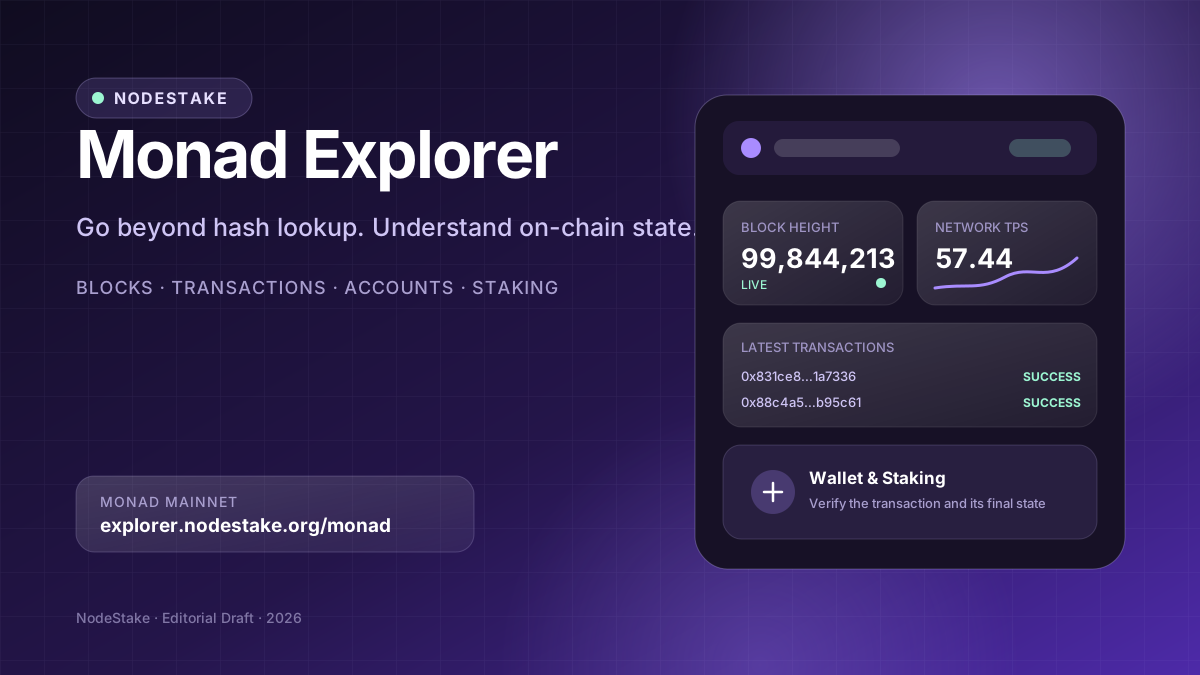
On a high-performance EVM network, a block explorer should do more than look up transaction hashes.
After sending a transfer or contract call, users need to know whether the network accepted it, whether execution succeeded, which block included it, how much gas it consumed, and which events the contract produced. Staking adds another layer of questions: validator performance, commission, voting power, epoch timing, and the final state of the staking position.
NodeStake Monad Explorer brings those signals together in one Monad Mainnet interface. It covers blocks, transactions, and accounts while also integrating Monad-native staking, validator consensus performance, MON economic data, and wallet actions into one continuous experience.
Open NodeStake Monad Explorer at https://explorer.nodestake.org/monad — and always verify the domain, network and final on-chain result before signing or acting on a transaction.
All pages and capabilities described below are based on the current public version of NodeStake Explorer. Block heights, prices, validator rankings, stake, commission, and APR change over time. Screenshots illustrate the interface and should not be treated as current values.
What can you do with NodeStake Monad Explorer?
The Explorer is designed around several practical workflows:
- Check network status — Chain ID, connection state, block height, average block time, TPS, gas price, active validators, and epoch.
- Browse blocks — recent blocks, historical heights, hashes, transaction counts, proposers, gas usage, and timestamps.
- Verify transactions — success or failure, height, From/To, amount, fee, gas, events, internal transactions, and raw data.
- Inspect accounts — spendable MON, delegated assets, pending assets, rewards, ERC-20 holdings, and recent activity.
- Look up tokens — token names, symbols, contract addresses, decimals, and coverage status from the official list.
- Evaluate validators — active status, voting power, commission, performance, self-bond, technical identity, and Validator ID.
- Manage staking — connect a wallet, start a stake, view positions and rewards, and track transaction and epoch state.
These are not isolated pages. A user can move from a recent transaction into its detail view, follow the From or To address to an account, or open a validator from the Staking list, verify its identity, and then begin the staking flow.
Dashboard: establish whether the network view is healthy
The Explorer home page is a real-time Monad Mainnet dashboard. The header identifies the current network, Chain ID 143, the selected RPC endpoint, and a connection state such as Online, Syncing, or Disconnected.
That status matters. It distinguishes ‘there is no on-chain data’ from ‘the current data source has not finished connecting.’ When the RPC has not returned block data, the Explorer shows a waiting or loading state instead of presenting an empty value as a valid result.
Network fundamentals
- Current epoch.
- Latest block height.
- Average block time calculated from recent samples.
- Number of active validators.
- Estimated staking APR when available.
Together, these signals help users establish whether the chain is still producing blocks, whether the validator set is available, and whether staking data has loaded.
Network Activity
The Network view derives recent transaction counts, gas price, TPS, and block-time movement from a bounded window of recent blocks. The displayed TPS is an observed value from that window, not Monad's theoretical maximum throughput.
The Explorer also states how many recent blocks contribute to the sample. If it is still collecting data, the interface exposes that coverage instead of presenting an incomplete window as a stable long-term metric.
Staking & Economy
The economic panel combines total stake, total MON supply, recent block rewards, circulating supply, market capitalisation, and MON price. Market price, circulating supply, and price history may rely on third-party sources, so they have a different availability boundary from direct on-chain data such as block height or transaction status.
The Market view offers Price, Volume, 24H, and 3D perspectives. If third-party history is temporarily unavailable, the page says so without blocking the Explorer's on-chain and staking functions.
Latest activity and personal view
The lower Dashboard includes Latest Blocks, Latest Transactions, Leading Validators, and My Wallet. From here, users can open the full block or transaction lists, connect a wallet, and inspect their MON balance, staking positions, and claimable rewards.
Blocks: move from the live head to a historical height
The Blocks page at https://explorer.nodestake.org/monad/block is more than a continuously updating list. Its top-level metrics include the latest block, estimated 24-hour block and transaction counts derived from recent samples, and average block time.
The page supports several ways to explore the chain:
- Switch between Recent and Historical views.
- Jump directly to a specified block height.
- Filter all blocks, blocks with transactions, or empty blocks.
- Restrict the view to Finalized blocks.
- Enable Auto refresh to follow the live chain head.
- Use the Transactions per block chart to inspect recent distribution.
- Display 10, 25, or 50 rows per page.
Each block row includes height, hash, transaction count, proposer, gas used, and time. Gas usage is shown both as an absolute amount and as a percentage of the block gas limit, making it easier to see when blocks are approaching capacity.
Proposer data also connects execution-layer block activity with the Monad validator set. That is a meaningful difference from generic EVM explorers that stop at transaction execution and do not expose the validator context behind block production.
Transactions: success is only the beginning of the investigation
The Transactions page at https://explorer.nodestake.org/monad/tx provides Recent and Explore entry points. Recent is designed for live activity and summarises the current window with transaction count, failure rate, average transactions per block, and median fee.
Every transaction row exposes:
- Success or Failed status.
- A shortened transaction hash.
- Message type, such as Contract Call, Transfer, or Block Reward.
- From and To addresses.
- Transferred amount and actual fee.
- Block height, relative time, and exact time.
Opening a transaction separates inclusion from execution details. The detail page includes Network, Chain ID, Height, Time, Gas Used/Limit, Fee, Total Amount, and message count.
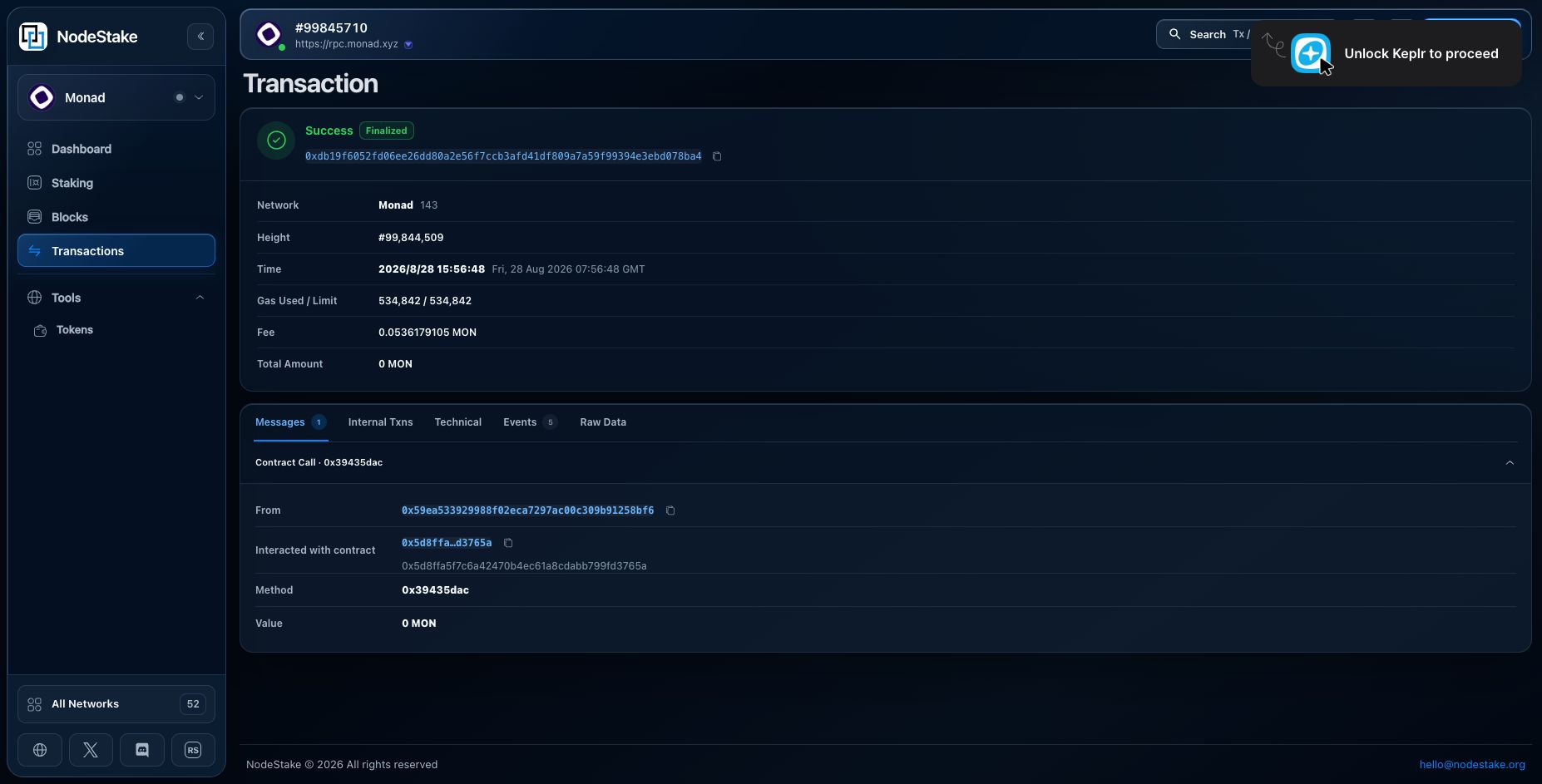
For contract calls, the Messages section identifies the sender, interacted-with contract, method selector, and value. Separate Internal Txns, Technical, Events, and Raw Data views preserve deeper execution context.
There is an important principle behind that design: when the Explorer does not have a trusted ABI for a method, it should preserve the original selector and calldata instead of presenting an unverified function signature as fact. For developers, raw input and event logs are often more reliable than a guessed method name.
To determine whether a transaction genuinely completed, check the following in order:
- Confirm that the status is Success rather than relying on a wallet broadcast message.
- Verify that the transaction has a specific block height.
- Check whether Gas Used, Fee, and Value match expectations.
- Confirm the From, To, and contract addresses.
- Inspect Events, Internal Txns, or Raw Data for the expected result.
Account: separate spendable funds, staking, and pending state
Entering a Monad EVM address in the global search opens the Account view, which is divided into Overview, Staking, and Activity.
The Portfolio section distinguishes several balances:
- Spendable — MON currently available for use.
- Delegated — MON already assigned to staking positions.
- Pending — assets still waiting for protocol processing.
- Staking rewards — currently observed staking rewards.
- ERC-20 holdings — balances discovered through known token identities.
That separation is more useful than a single total balance. If a user has submitted a stake or exit operation, an unchanged wallet balance does not automatically mean failure: the assets may be waiting for protocol or epoch processing.
The Staking section shows whether the account has a Monad delegation and provides a route into position management. Activity lists recent on-chain activity associated with the address.
Tokens: clear provenance without implying endorsement
The Monad Token List at https://explorer.nodestake.org/monad/tokens contains ERC-20 identities published in the official Monad token registry. Native MON is intentionally excluded from the ERC-20 list.
Users can search by name, symbol, or contract address and switch between All and Core reviewed entries. Each row includes the token symbol and full name, contract address, decimals, and an Official list entry or other coverage status.
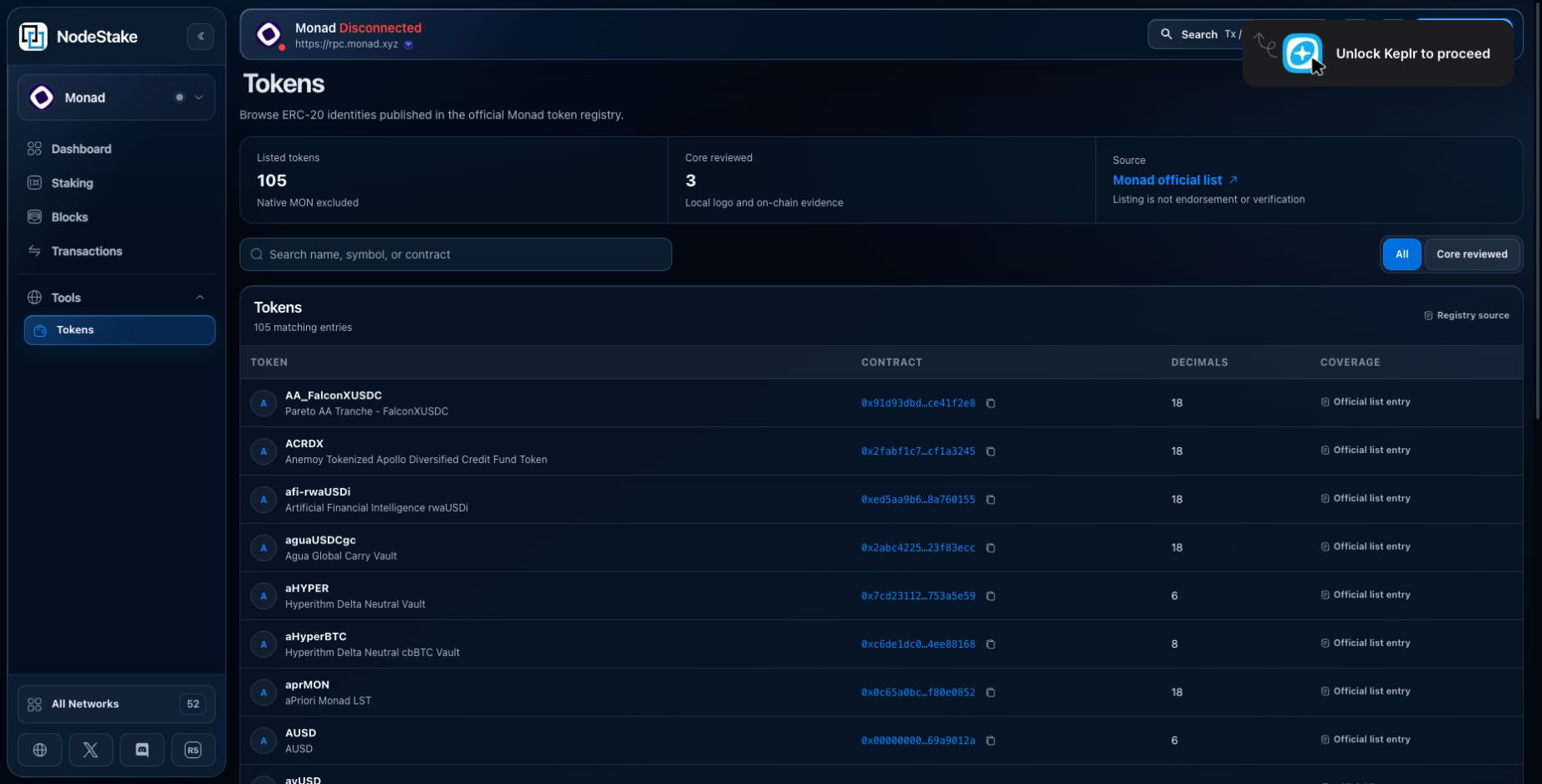
‘Official list entry’ means that the identity came from the designated registry. It does not mean that the contract has passed a security audit, nor does it guarantee the project's authenticity, value, or liquidity. Before granting approval, trading, or adding an asset, users should confirm the full contract address through the project's official channels.
Staking: a validator should not be judged by rank alone
The Monad Staking page at https://explorer.nodestake.org/monad/staking begins with the current epoch, next epoch, total stake, APR, and active validator count. Validators are separated into Active and Inactive sets, with search, sorting, and pagination.
Each row contains Rank, Validator, Voting Power, 24H Changes, Delegators, Commission, and Actions. Voting Power includes both the staked amount and the validator's share of the current set, helping users identify concentration.
NodeStake is also surfaced in a dedicated ‘Stake with NodeStake’ panel, so users do not need to depend on a continuously changing rank to find it.
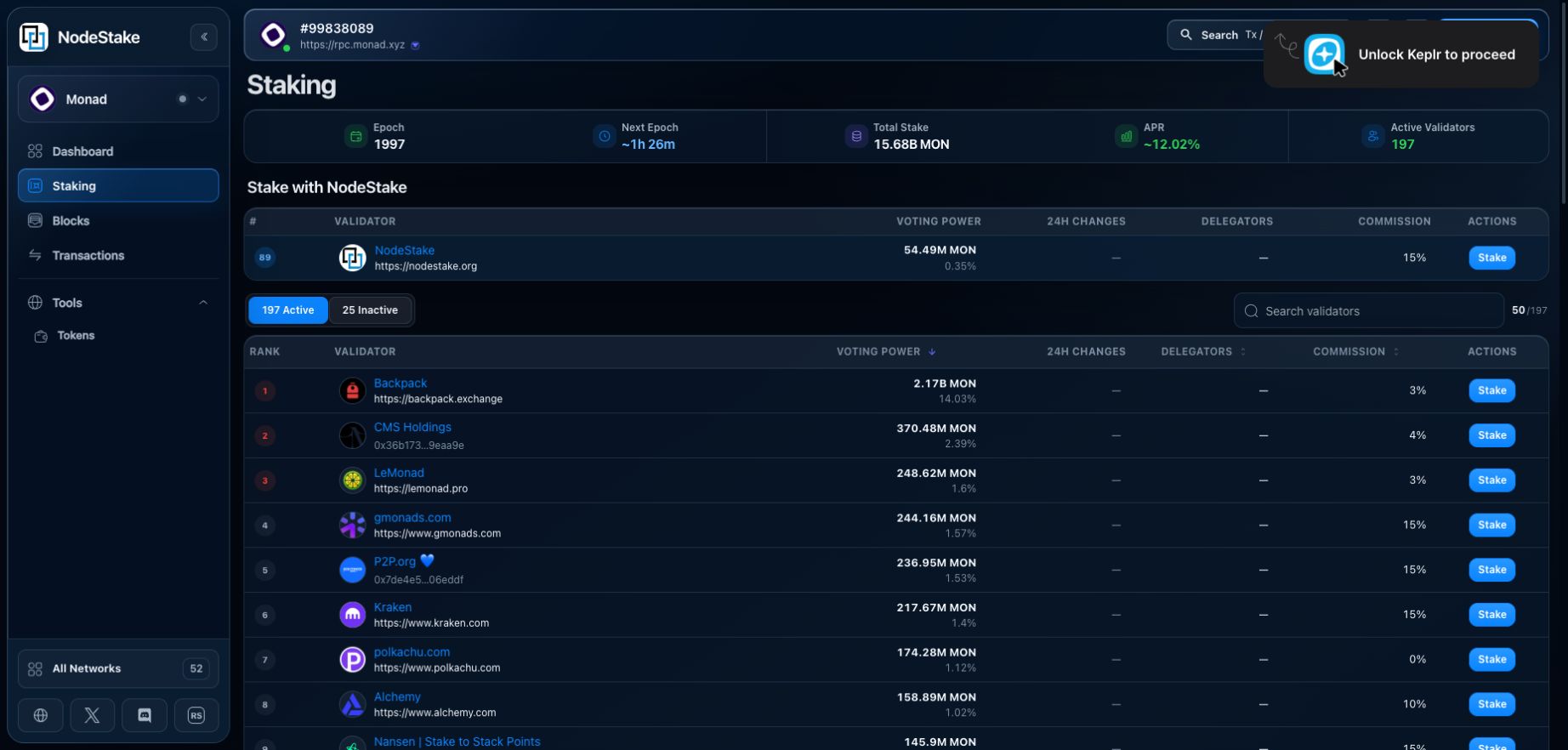
Rank is not a quality guarantee. A more robust decision continues into the validator detail page, where users can inspect consensus performance, technical identity, and staking economics.
Validator Detail: connect technical identity with actual performance
The validator detail page provides Overview, Delegations, and Activity entry points. Validator Health uses a configured observer to report recent 24-hour consensus performance, including uptime, commits, timeouts, Active Set status, and the Finalized/Timeout distribution across recent consensus opportunities.
The Stake & Commission section includes Total Staked, Voting Power, Estimated APR, Commission, Claimable Rewards, next-epoch commission information, and Self Bonded stake.
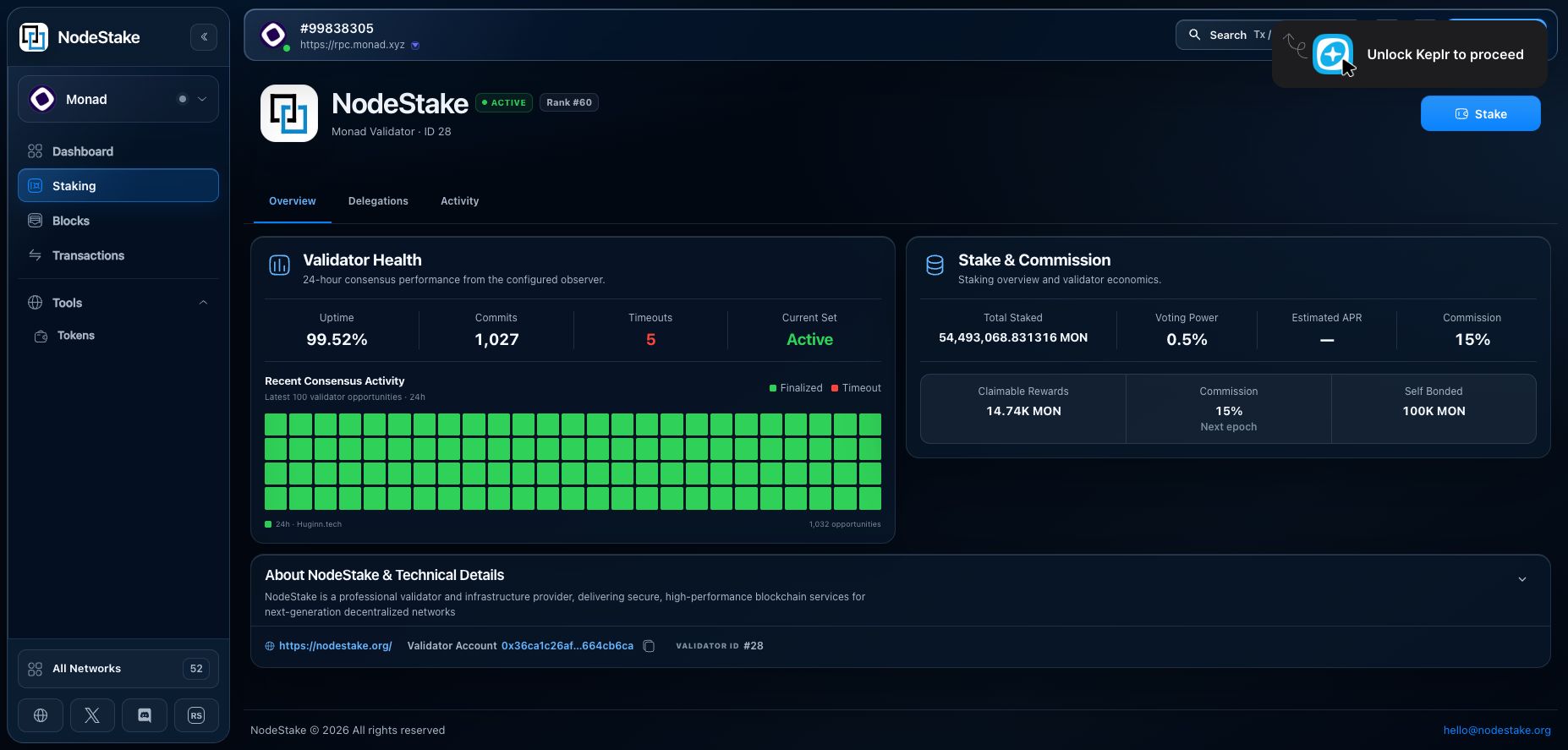
The lower section also exposes the validator description, official website, Validator Account, and Validator ID. Names and logos can be imitated, so these stable identifiers should take priority during verification.
Open NodeStake's Monad validator directly: https://explorer.nodestake.org/monad/staking/28
Before signing, users should confirm Validator ID 28, the official website, and the wallet target again on the live page.
Complete a non-custodial stake in the same interface
After connecting a compatible wallet, users can enter the Stake MON flow from the validator list, validator detail page, or account view. The Explorer does not hold seed phrases or private keys. It prepares and presents the transaction, while the wallet remains responsible for the final signature.
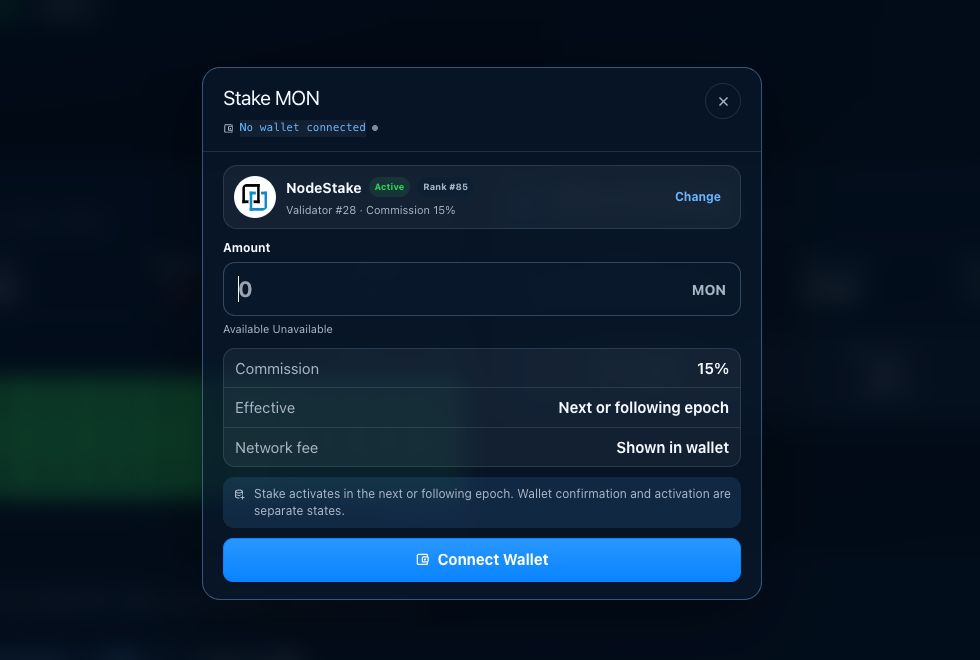
Before approving a stake, verify at least the following:
- The site domain is explorer.nodestake.org.
- The selected network is Monad Mainnet and Chain ID is 143.
- The intended validator and Validator ID are correct.
- The MON amount matches the intended stake.
- Commission and estimated activation timing have been reviewed.
- The requesting site, network, and fee in the wallet match the Explorer.
Wallet confirmation is not completion: staking has four states
Monad staking changes interact with epoch boundaries. A wallet confirmation and an active staking position are therefore not the same state.
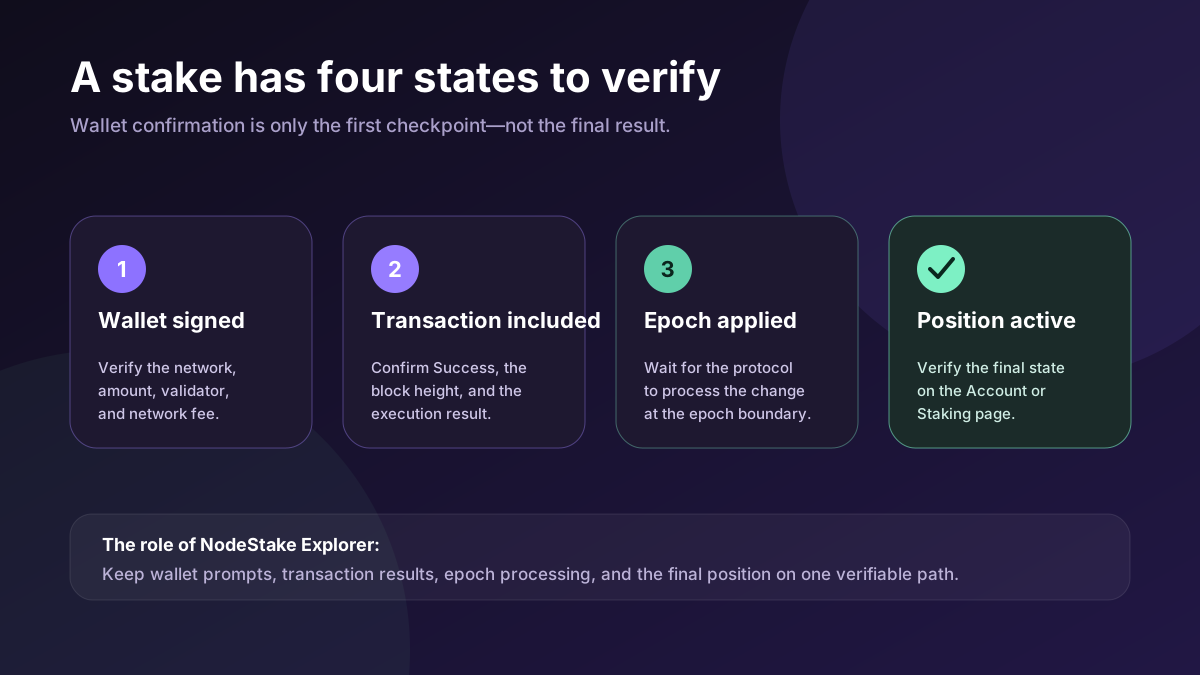
1. The wallet has signed
This proves only that the user approved the request in the wallet. The network, validator, amount, and fee should be checked at this stage, but the stake must not yet be described as complete.
2. The transaction has been included
Search the transaction hash in the Explorer. Confirm a Success status and a specific block height. If the transaction failed, inspect gas, error information, events, and raw data before deciding what to do next.
3. The protocol has applied the change at an epoch boundary
Even after successful inclusion, the position may need to wait for the relevant epoch boundary. During that period, the account may show Pending, or the new stake may not yet appear as active.
4. The final staking position is active
Return to the account's Staking view or the validator's Delegations view and confirm that the amount and status have updated. Only then has the on-chain staking state reached its intended result.
The same verification discipline should be applied to reward claims, undelegations, and withdrawals: wallet confirmation, transaction success, protocol waiting periods, and final balance changes are distinct states.
Three practical workflows
The wallet does not provide a clear result after sending
Paste the transaction hash into the Explorer. Start with Success/Failed and block height, then verify From, To, Fee, Gas, and Events. If the transaction cannot be found, confirm that the hash belongs to Monad Mainnet and check the RPC connection state displayed in the Explorer header.
Choosing a validator for a new stake
Start on the Staking page and confirm that the validator is in the Active Set. Compare Voting Power and Commission, then open the detail page to inspect 24-hour Uptime, Commits, Timeouts, Self Bonded stake, website, and Validator ID. Verify the validator and amount one final time in the wallet.
The staking transaction succeeded, but the position is missing
Use transaction details to confirm an actual Success result, then check the current epoch and estimated activation timing. Do not repeatedly submit the same transaction. After the epoch has applied the change, verify the position under Account → Staking or the validator's Delegations view.
Understand the boundary of each data source
Different data types update differently and carry different trust boundaries:
- Block height, transaction status, gas, and events are direct execution data.
- Validator performance comes from a configured observer and depends on its observation window and coverage.
- APR is an estimate, not a fixed or guaranteed return.
- Rank, voting power, commission, and stake change with the validator set.
- MON price, market capitalisation, and historical charts may rely on third-party market data.
- A token registry entry is not a security audit, investment endorsement, or guarantee of a risk-free asset.
- A wallet prompt represents a pending or signed request and does not replace the final on-chain result.
When the interface shows Syncing, Disconnected, Loading, or unavailable, treat the data as incomplete, not as a confirmed value of zero.
One shared entry point for users, developers, and validators
The value of NodeStake Monad Explorer is not that it copies a generic EVM explorer. It brings Monad execution, validator consensus, and native staking into one coherent product experience.
For everyday users, it provides clear transaction, account, and asset views. For delegators, it adds validator comparison, operational performance, and staking management. For developers, it preserves gas, contract addresses, method selectors, events, and raw data. For node operators, it offers a window into block production, consensus performance, and validator status.
Most importantly, it extends the meaning of an on-chain action beyond ‘the wallet button was clicked.’ A complete result means that execution succeeded, the protocol processed the change, and the final state actually updated. That verifiable state path is what an Explorer designed for real users and real funds should provide.
Open NodeStake Monad Explorer: https://explorer.nodestake.org/monad